Introduction
You can configure Copilot code review to review pull requests automatically. For an overview of automatic pull request reviews, see GitHub Copilotによるコードレビューについて.
Configuring automatic code review for your own pull requests
メモ
This is only available if you are on the Copilot Pro, Copilot Pro+, or Copilot Max plans.
-
任意のページの右上隅にあるプロフィール画像をクリックしてから、[ Copilot settings] をクリックします。
-
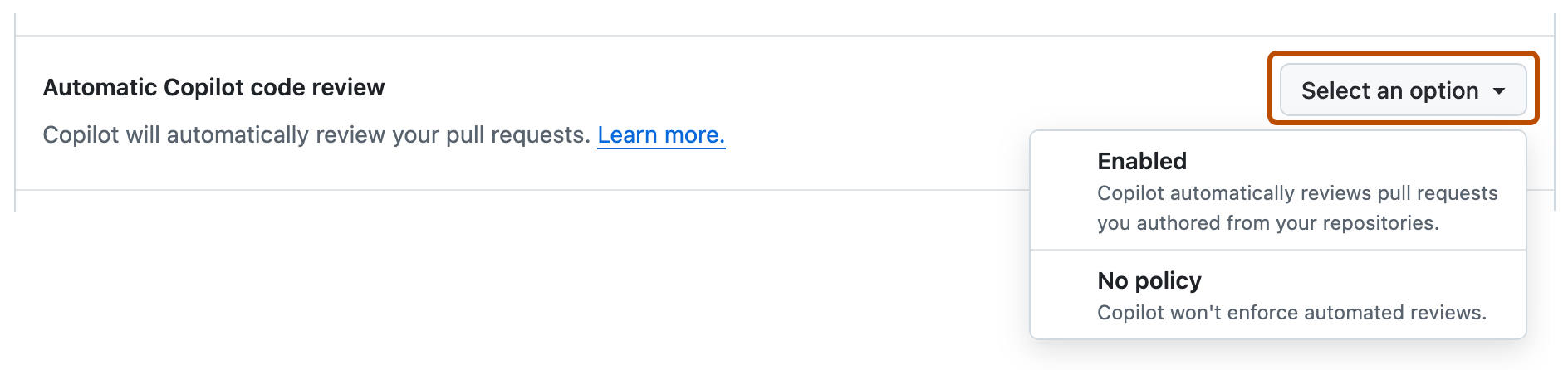
Locate the Automatic Copilot code review option and click the dropdown button.
-
In the dropdown menu, select Enabled.

Configuring automatic code review for a repository
You can enable automatic code reviews for a repository and customize how code reviews are performed.
Enabling automatic reviews
-
GitHub で、リポジトリのメイン ページに移動します。
-
リポジトリ名の下にある [Settings] をクリックします。 [設定] タブが表示されない場合は、 [] ドロップダウン メニューを選び、 [設定] をクリックします。
![タブを示すリポジトリ ヘッダーのスクリーンショット。 [設定] タブが濃いオレンジ色の枠線で強調表示されています。](/assets/cb-28260/images/help/repository/repo-actions-settings.png)
-
左側のサイド バーの [コードと自動化] の下で、 [ルール] をクリックし、 [ルールセット] をクリックします。
![リポジトリの [設定] ページのサイド バーのスクリーンショット。 [ルール] サブメニューが展開され、[ルールセット] オプションの枠線がオレンジ色で表示されています。](/assets/cb-80504/images/help/repository/rulesets-settings.png)
-
「新しいルールセット」をクリックします。
-
[新しいブランチ ルールセット] をクリックします。
-
[ルールセット名] に、ルールセットの名前を入力します。
-
ルールセットをアクティブにするには、[Enforcement Status] で [Active] を選びます。
-
Under "Target branches," click Add target and choose one of the options—for example, Include default branch or Include all branches.
-
[Target branches] で、[Add target] をクリックし、ターゲット オプションのいずれかを選びます。
-
[Branch rules] で、[Automatically request Copilot code review] を選びます。
これにより、一連の補助的なオプションが展開されます。
![[Automatically request Copilot code review] ブランチ ルールセット オプションのスクリーンショット。](/assets/cb-41247/images/help/copilot/code-review/automatic-code-review.png)
-
必要に応じて、pull request に対するすべての新しいプッシュを Copilot にレビューさせる場合は、[Review new pushes] を選びます。
このオプションが選択されていない場合、Copilot は pull request を 1 回だけレビューします。
-
必要に応じて、まだドラフト段階の pull request を Copilot でレビューする場合は、[Review draft pull requests] を選びます。
これは、人によるレビューを依頼する前に、エラーを早期に検出するのに役立つオプションです。
-
ページの下部にある [Create] をクリックします。
![タブを示すリポジトリ ヘッダーのスクリーンショット。 [設定] タブが濃いオレンジ色の枠線で強調表示されています。](/assets/cb-28260/mw-1440/images/help/repository/repo-actions-settings.webp)
![リポジトリの [設定] ページのサイド バーのスクリーンショット。 [ルール] サブメニューが展開され、[ルールセット] オプションの枠線がオレンジ色で表示されています。](/assets/cb-80504/mw-1440/images/help/repository/rulesets-settings.webp)
![[Automatically request Copilot code review] ブランチ ルールセット オプションのスクリーンショット。](/assets/cb-41247/mw-1440/images/help/copilot/code-review/automatic-code-review.webp)
Customizing Copilot code review
You can configure how Copilot code review completes code reviews in your repository.
-
GitHub で、リポジトリのメイン ページに移動します。
-
リポジトリ名の下にある [Settings] をクリックします。 [設定] タブが表示されない場合は、 [] ドロップダウン メニューを選び、 [設定] をクリックします。
-
サイドバーの [Code, planning, and automation](コード、計画、自動化) の下で、 click Copilot, then Code review.
-
To choose the depth of Copilot code reviews, next to "Review effort level," select the effort level for automatic reviews in this repository.
- Lite: Standard review.
- Balanced: Deeper analysis of complex logic, security-sensitive code, and cross-service changes.
Balanced reviews use more AI credits, and may consume marginally more GitHub Actions minutes. See GitHub Copilotによるコードレビューについて.
-
To choose whether Copilot can approve pull requests in your repository, configure the settings under "Auto-approval."
-
Allow Copilot to approve pull requests: Toggle on to let Copilot submit approving reviews.
-
Allow Copilot approvals to count toward merge requirements: Toggle on so Copilot approvals can satisfy pull request approval requirements.
-
File paths: Optionally, limit which pull requests count toward merge requirements. Enter one file glob per line to count approvals only on pull requests where every changed file matches one of the globs. Leave blank to count approvals for all files. Up to 15 globs are supported.
メモ
Copilot approvals are in パブリック プレビュー and subject to change.
-
Configuring automatic code review for repositories in an organization
You can enable automatic code reviews for repositories in your organization and customize how code reviews are performed.
Enabling automatic reviews
-
GitHub の右上隅にあるプロフィール画像をクリックしてから、[ Your organizations] をクリックします。
-
組織をクリックして選択します。
-
Organization 名の下で、[ Settings] をクリックします。 [設定] タブが表示されない場合は、 [] ドロップダウン メニューを選び、 [設定] をクリックします。
![組織のプロファイルのタブのスクリーンショット。 [設定] タブが濃いオレンジ色の枠線で囲まれています。](/assets/cb-49309/images/help/discussions/org-settings-global-nav-update.png)
-
サイドバーの [Code, planning, and automation](コード、計画、自動化) の下で、[リポジトリ クリックし、[ルールセット] をクリックします。
![組織の設定ページのスクリーンショット。 サイド バーで、[ルールセット] というラベルの付いたリンクがオレンジ色の枠線で囲まれています。](/assets/cb-32436/images/help/organizations/sidebar-repository-rulesets.png)
-
「新しいルールセット」をクリックします。
-
[新しいブランチ ルールセット] をクリックします。
-
[ルールセット名] に、ルールセットの名前を入力します。
-
ルールセットをアクティブにするには、[Enforcement Status] で [Active] を選びます。
-
Under "Target repositories," click Add target and choose either Include by pattern or Exclude by pattern.
-
Type a pattern that matches the repository names you want to target—for example,
*featureto match all repositories with names ending infeature.For pattern-matching syntax, see 組織内のリポジトリのルールセットを作成する.
-
Click Add inclusion pattern or Add exclusion pattern.
-
Repeat for any additional patterns.
メモ
You can add multiple targeting criteria to the same ruleset. Exclusion patterns are applied after inclusion patterns. For example, you could include any repositories matching the pattern
*cat*, and specifically exclude a repository matching the patternnot-a-cat. -
[Target branches] で、[Add target] をクリックし、ターゲット オプションのいずれかを選びます。
-
[Branch rules] で、[Automatically request Copilot code review] を選びます。
これにより、一連の補助的なオプションが展開されます。
-
必要に応じて、pull request に対するすべての新しいプッシュを Copilot にレビューさせる場合は、[Review new pushes] を選びます。
このオプションが選択されていない場合、Copilot は pull request を 1 回だけレビューします。
-
必要に応じて、まだドラフト段階の pull request を Copilot でレビューする場合は、[Review draft pull requests] を選びます。
これは、人によるレビューを依頼する前に、エラーを早期に検出するのに役立つオプションです。
-
ページの下部にある [Create] をクリックします。
![組織のプロファイルのタブのスクリーンショット。 [設定] タブが濃いオレンジ色の枠線で囲まれています。](/assets/cb-49309/mw-1440/images/help/discussions/org-settings-global-nav-update.webp)
![組織の設定ページのスクリーンショット。 サイド バーで、[ルールセット] というラベルの付いたリンクがオレンジ色の枠線で囲まれています。](/assets/cb-32436/mw-1440/images/help/organizations/sidebar-repository-rulesets.webp)
Customizing Copilot code review
You can configure how Copilot code review completes code reviews in repositories in your organization.
-
GitHub の右上隅にあるプロフィール画像をクリックしてから、[ Your organizations] をクリックします。
-
組織をクリックして選択します。
-
Organization 名の下で、[ Settings] をクリックします。 [設定] タブが表示されない場合は、 [] ドロップダウン メニューを選び、 [設定] をクリックします。
-
サイドバーの [Code, planning, and automation](コード、計画、自動化) の下で、 click Copilot, then Code review.
-
To choose the depth of Copilot code reviews, next to "Review effort level," select the default effort level for automatic reviews in repositories in your organization.
- Lite: Standard review.
- Balanced: Deeper analysis of complex logic, security-sensitive code, and cross-service changes.
Balanced reviews use more AI credits, and may consume marginally more GitHub Actions minutes. See GitHub Copilotによるコードレビューについて.
-
To choose whether Copilot can approve pull requests in your repositories, select an option under "Approvals," next to "Count Copilot approvals toward merge requirements."
-
Enabled everywhere: Copilot approvals can count toward merge requirements in every repository in the organization.
-
Let repositories decide: Repository admins can decide this in repository settings.
-
Enable for selected repositories: Copilot approvals can count toward merge requirements only in the repositories you select. If you choose this option, also assign the repositories you want to enable this for.
-
Disabled everywhere: Copilot approvals cannot count toward merge requirements in any repository in the organization.
メモ
Copilot approvals are in パブリック プレビュー and subject to change.
-
Configuring automatic code review for an enterprise
You can enable automatic code reviews for your enterprise and customize how code reviews are performed.
Enabling automatic reviews
- Create an enterprise-level branch ruleset. See Enterprise でルールセットを使ってコード ガバナンスを適用する.
- Target the organizations and repositories where Copilot code review should run automatically.
- Enable the Automatically request Copilot code review policy.
- Optionally, enable automatic reviews for draft pull requests and after each push to a pull request.
- Click Create.
Customizing Copilot code review
You can configure how Copilot code review completes code reviews for your enterprise.
- 企業ページに移動してください。 たとえば、GitHub.com の [Enterprise] ページから。
- ページの上部にある AI コントロールをクリックします。
- Scroll down to "Available Agents", then click Copilot code review.
- Next to "Copilot code review", select a policy.
- Then choose which Copilot code review features to enable for your enterprise.
- To choose whether Copilot can approve pull requests in your organizations, next to "Allow Copilot to approve pull requests," select a policy.
-
Let organizations decide: Organization owners can choose whether to enable Copilot approvals.
-
Enable for selected organizations: Copilot approvals are enabled only for the organizations you select.
-
Disabled everywhere: Organizations cannot enable Copilot approvals. This is the default.
メモ
Copilot approvals are in パブリック プレビュー and subject to change.
-