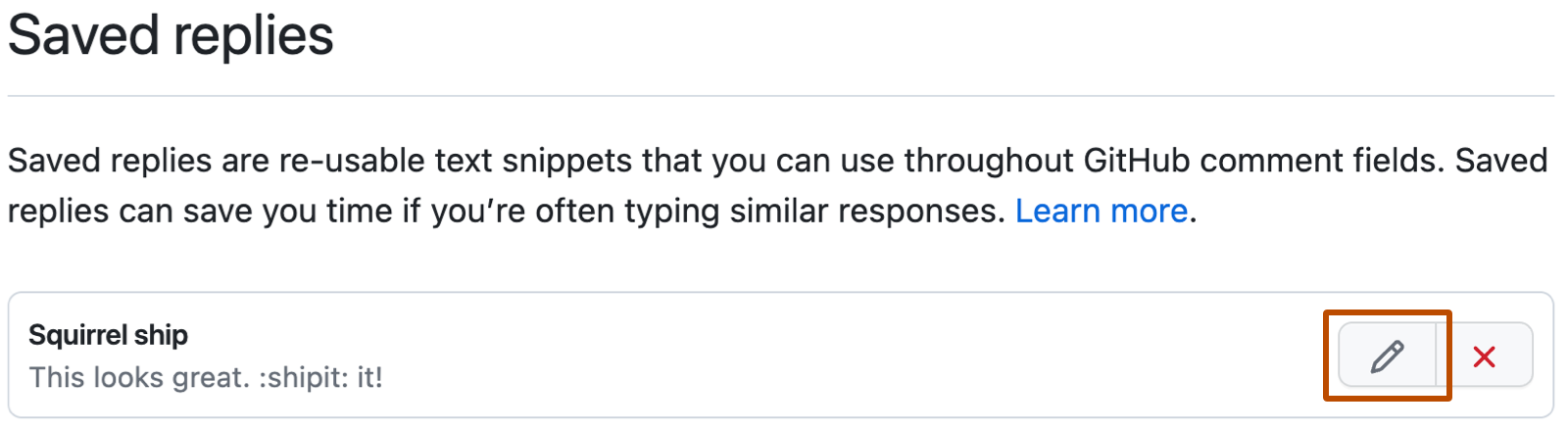
{"meta":{"title":"Modification d’une réponse enregistrée","intro":"Vous pouvez modifier le titre et le corps d’une réponse enregistrée.","product":"Bien démarrer","breadcrumbs":[{"href":"/fr/get-started","title":"Bien démarrer"},{"href":"/fr/get-started/writing-on-github","title":"Écriture sur GitHub"},{"href":"/fr/get-started/writing-on-github/working-with-saved-replies","title":"Utiliser des réponses enregistrées"},{"href":"/fr/get-started/writing-on-github/working-with-saved-replies/editing-a-saved-reply","title":"Modification d’une réponse enregistrée"}],"documentType":"article"},"body":"# Modification d’une réponse enregistrée\n\nVous pouvez modifier le titre et le corps d’une réponse enregistrée.\n\n1. Dans le coin supérieur droit de n’importe quelle page sur GitHub, cliquez sur votre photo de profil, puis sur **<svg version=\"1.1\" width=\"16\" height=\"16\" viewBox=\"0 0 16 16\" class=\"octicon octicon-gear\" aria-label=\"gear\" role=\"img\"><path d=\"M8 0a8.2 8.2 0 0 1 .701.031C9.444.095 9.99.645 10.16 1.29l.288 1.107c.018.066.079.158.212.224.231.114.454.243.668.386.123.082.233.09.299.071l1.103-.303c.644-.176 1.392.021 1.82.63.27.385.506.792.704 1.218.315.675.111 1.422-.364 1.891l-.814.806c-.049.048-.098.147-.088.294.016.257.016.515 0 .772-.01.147.038.246.088.294l.814.806c.475.469.679 1.216.364 1.891a7.977 7.977 0 0 1-.704 1.217c-.428.61-1.176.807-1.82.63l-1.102-.302c-.067-.019-.177-.011-.3.071a5.909 5.909 0 0 1-.668.386c-.133.066-.194.158-.211.224l-.29 1.106c-.168.646-.715 1.196-1.458 1.26a8.006 8.006 0 0 1-1.402 0c-.743-.064-1.289-.614-1.458-1.26l-.289-1.106c-.018-.066-.079-.158-.212-.224a5.738 5.738 0 0 1-.668-.386c-.123-.082-.233-.09-.299-.071l-1.103.303c-.644.176-1.392-.021-1.82-.63a8.12 8.12 0 0 1-.704-1.218c-.315-.675-.111-1.422.363-1.891l.815-.806c.05-.048.098-.147.088-.294a6.214 6.214 0 0 1 0-.772c.01-.147-.038-.246-.088-.294l-.815-.806C.635 6.045.431 5.298.746 4.623a7.92 7.92 0 0 1 .704-1.217c.428-.61 1.176-.807 1.82-.63l1.102.302c.067.019.177.011.3-.071.214-.143.437-.272.668-.386.133-.066.194-.158.211-.224l.29-1.106C6.009.645 6.556.095 7.299.03 7.53.01 7.764 0 8 0Zm-.571 1.525c-.036.003-.108.036-.137.146l-.289 1.105c-.147.561-.549.967-.998 1.189-.173.086-.34.183-.5.29-.417.278-.97.423-1.529.27l-1.103-.303c-.109-.03-.175.016-.195.045-.22.312-.412.644-.573.99-.014.031-.021.11.059.19l.815.806c.411.406.562.957.53 1.456a4.709 4.709 0 0 0 0 .582c.032.499-.119 1.05-.53 1.456l-.815.806c-.081.08-.073.159-.059.19.162.346.353.677.573.989.02.03.085.076.195.046l1.102-.303c.56-.153 1.113-.008 1.53.27.161.107.328.204.501.29.447.222.85.629.997 1.189l.289 1.105c.029.109.101.143.137.146a6.6 6.6 0 0 0 1.142 0c.036-.003.108-.036.137-.146l.289-1.105c.147-.561.549-.967.998-1.189.173-.086.34-.183.5-.29.417-.278.97-.423 1.529-.27l1.103.303c.109.029.175-.016.195-.045.22-.313.411-.644.573-.99.014-.031.021-.11-.059-.19l-.815-.806c-.411-.406-.562-.957-.53-1.456a4.709 4.709 0 0 0 0-.582c-.032-.499.119-1.05.53-1.456l.815-.806c.081-.08.073-.159.059-.19a6.464 6.464 0 0 0-.573-.989c-.02-.03-.085-.076-.195-.046l-1.102.303c-.56.153-1.113.008-1.53-.27a4.44 4.44 0 0 0-.501-.29c-.447-.222-.85-.629-.997-1.189l-.289-1.105c-.029-.11-.101-.143-.137-.146a6.6 6.6 0 0 0-1.142 0ZM11 8a3 3 0 1 1-6 0 3 3 0 0 1 6 0ZM9.5 8a1.5 1.5 0 1 0-3.001.001A1.5 1.5 0 0 0 9.5 8Z\"></path></svg> Paramètres**.\n2. Dans la barre latérale, sous « Code, planification et automatisation », Cliquez sur **<svg version=\"1.1\" width=\"16\" height=\"16\" viewBox=\"0 0 16 16\" class=\"octicon octicon-reply\" aria-label=\"reply\" role=\"img\"><path d=\"M6.78 1.97a.75.75 0 0 1 0 1.06L3.81 6h6.44A4.75 4.75 0 0 1 15 10.75v2.5a.75.75 0 0 1-1.5 0v-2.5a3.25 3.25 0 0 0-3.25-3.25H3.81l2.97 2.97a.749.749 0 0 1-.326 1.275.749.749 0 0 1-.734-.215L1.47 7.28a.75.75 0 0 1 0-1.06l4.25-4.25a.75.75 0 0 1 1.06 0Z\"></path></svg> Réponses enregistrées**.\n3. Sous « Réponses enregistrées », en regard de la réponse enregistrée que vous souhaitez modifier, cliquez sur <svg version=\"1.1\" width=\"16\" height=\"16\" viewBox=\"0 0 16 16\" class=\"octicon octicon-pencil\" aria-label=\"The pencil\" role=\"img\"><path d=\"M11.013 1.427a1.75 1.75 0 0 1 2.474 0l1.086 1.086a1.75 1.75 0 0 1 0 2.474l-8.61 8.61c-.21.21-.47.364-.756.445l-3.251.93a.75.75 0 0 1-.927-.928l.929-3.25c.081-.286.235-.547.445-.758l8.61-8.61Zm.176 4.823L9.75 4.81l-6.286 6.287a.253.253 0 0 0-.064.108l-.558 1.953 1.953-.558a.253.253 0 0 0 .108-.064Zm1.238-3.763a.25.25 0 0 0-.354 0L10.811 3.75l1.439 1.44 1.263-1.263a.25.25 0 0 0 0-.354Z\"></path></svg>.\n\n![Capture d'écran des paramètres GitHub pour « Réponses enregistrées ». À droite de la réponse « Écureuil de navire », un bouton d'édition avec une icône de crayon est souligné en orange.](/assets/images/help/writing/saved-replies-edit-existing.png)\n\n1. Sous « Modifier la réponse enregistrée », modifiez le titre ou le contenu de la réponse enregistrée.\n2. Cliquez sur **Mettre à jour la réponse enregistrée**.\n\n## Pour aller plus loin\n\n* [Création d’une réponse enregistrée](/fr/get-started/writing-on-github/working-with-saved-replies/creating-a-saved-reply)\n* [Suppression d’une réponse enregistrée](/fr/get-started/writing-on-github/working-with-saved-replies/deleting-a-saved-reply)\n* [Utilisation de réponses enregistrées](/fr/get-started/writing-on-github/working-with-saved-replies/using-saved-replies)"}