# 使用已保存回复

对议题或拉取请求进行评论时，可添加您已设置的已保存回复。 已保存回复可以是整个评论；或者如果您想要自定义，可以添加或删除内容。

1. 在 GitHub 上，导航到存储库的主页面。1. 在仓库名称下，单击 <svg version="1.1" width="16" height="16" viewBox="0 0 16 16" class="octicon octicon-issue-opened" aria-label="issue-opened" role="img"><path d="M8 9.5a1.5 1.5 0 1 0 0-3 1.5 1.5 0 0 0 0 3Z"></path><path d="M8 0a8 8 0 1 1 0 16A8 8 0 0 1 8 0ZM1.5 8a6.5 6.5 0 1 0 13 0 6.5 6.5 0 0 0-13 0Z"></path></svg>“Issues”或 <svg version="1.1" width="16" height="16" viewBox="0 0 16 16" class="octicon octicon-git-pull-request" aria-label="git-pull-request" role="img"><path d="M1.5 3.25a2.25 2.25 0 1 1 3 2.122v5.256a2.251 2.251 0 1 1-1.5 0V5.372A2.25 2.25 0 0 1 1.5 3.25Zm5.677-.177L9.573.677A.25.25 0 0 1 10 .854V2.5h1A2.5 2.5 0 0 1 13.5 5v5.628a2.251 2.251 0 1 1-1.5 0V5a1 1 0 0 0-1-1h-1v1.646a.25.25 0 0 1-.427.177L7.177 3.427a.25.25 0 0 1 0-.354ZM3.75 2.5a.75.75 0 1 0 0 1.5.75.75 0 0 0 0-1.5Zm0 9.5a.75.75 0 1 0 0 1.5.75.75 0 0 0 0-1.5Zm8.25.75a.75.75 0 1 0 1.5 0 .75.75 0 0 0-1.5 0Z"></path></svg>“Pull requests”\*\*\*\*\*\*\*\*。

   ![存储库的主页的屏幕截图。 在水平导航栏中，以橙色框出了“议题”和“拉取请求”选项卡。](/assets/images/help/repository/repo-settings-issues-pull-requests-global-nav-update.png)
2. 单击所需的议题或拉取请求。
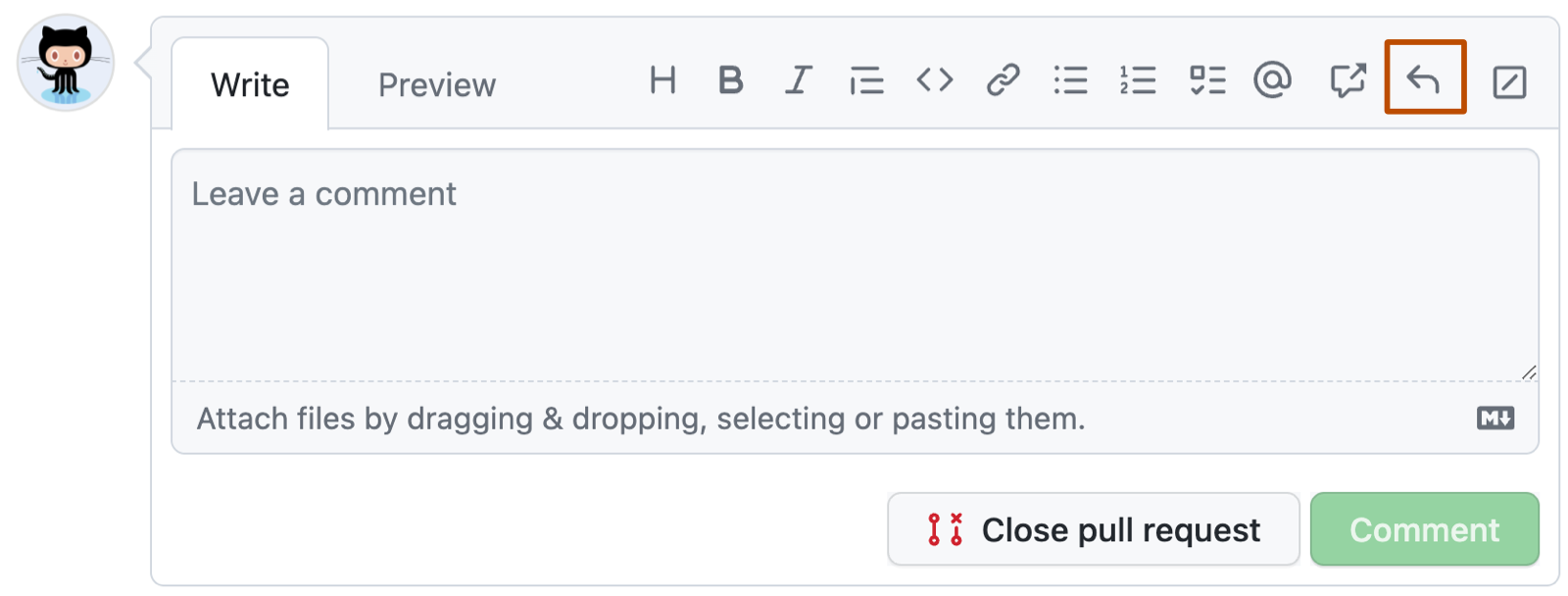
3. 要添加已保存的回复，请在注释字段上选择 <svg version="1.1" width="16" height="16" viewBox="0 0 16 16" class="octicon octicon-reply" aria-label="The mail reply" role="img"><path d="M6.78 1.97a.75.75 0 0 1 0 1.06L3.81 6h6.44A4.75 4.75 0 0 1 15 10.75v2.5a.75.75 0 0 1-1.5 0v-2.5a3.25 3.25 0 0 0-3.25-3.25H3.81l2.97 2.97a.749.749 0 0 1-.326 1.275.749.749 0 0 1-.734-.215L1.47 7.28a.75.75 0 0 1 0-1.06l4.25-4.25a.75.75 0 0 1 1.06 0Z"></path></svg>。

![GitHub 注释框的屏幕截图。 在工具栏上，带有向左弯曲箭头的回复按钮用深橙色框出。](/assets/images/help/writing/saved-replies-button.png)

1. 从列表中，选择您想要添加到评论的已保存回复。 （可选）编辑已保存回复的内容。
2. 选择**Comment**以添加注释。

> \[!TIP]
>
> * 您可以使用键盘快捷键通过已保存回复自动填充评论。 有关详细信息，请参阅“[键盘快捷方式](/zh/get-started/accessibility/keyboard-shortcuts#comments)”。
> * 您可通过输入已保存回复的标题来过滤该列表。

## 其他阅读材料

* [创建已保存回复](/zh/get-started/writing-on-github/working-with-saved-replies/creating-a-saved-reply)
* [编辑已保存回复](/zh/get-started/writing-on-github/working-with-saved-replies/editing-a-saved-reply)
* [删除已保存回复](/zh/get-started/writing-on-github/working-with-saved-replies/deleting-a-saved-reply)